Hunting season is coming up fast. If you miss a date, you lose a chance. That's why you need the right tool. In this guide we’ll walk through the top hunting apps for season tracking, show what each one does, and give you step‑by‑step tips to get the most out of them. By the end you’ll know which app fits your style, budget, and the lands you hunt.
1. HuntTrack Pro , All‑in‑One Season Planner
HuntTrack Pro aims to be the one‑stop shop for every hunter. It bundles a map, a calendar, and a log so you never need another app.
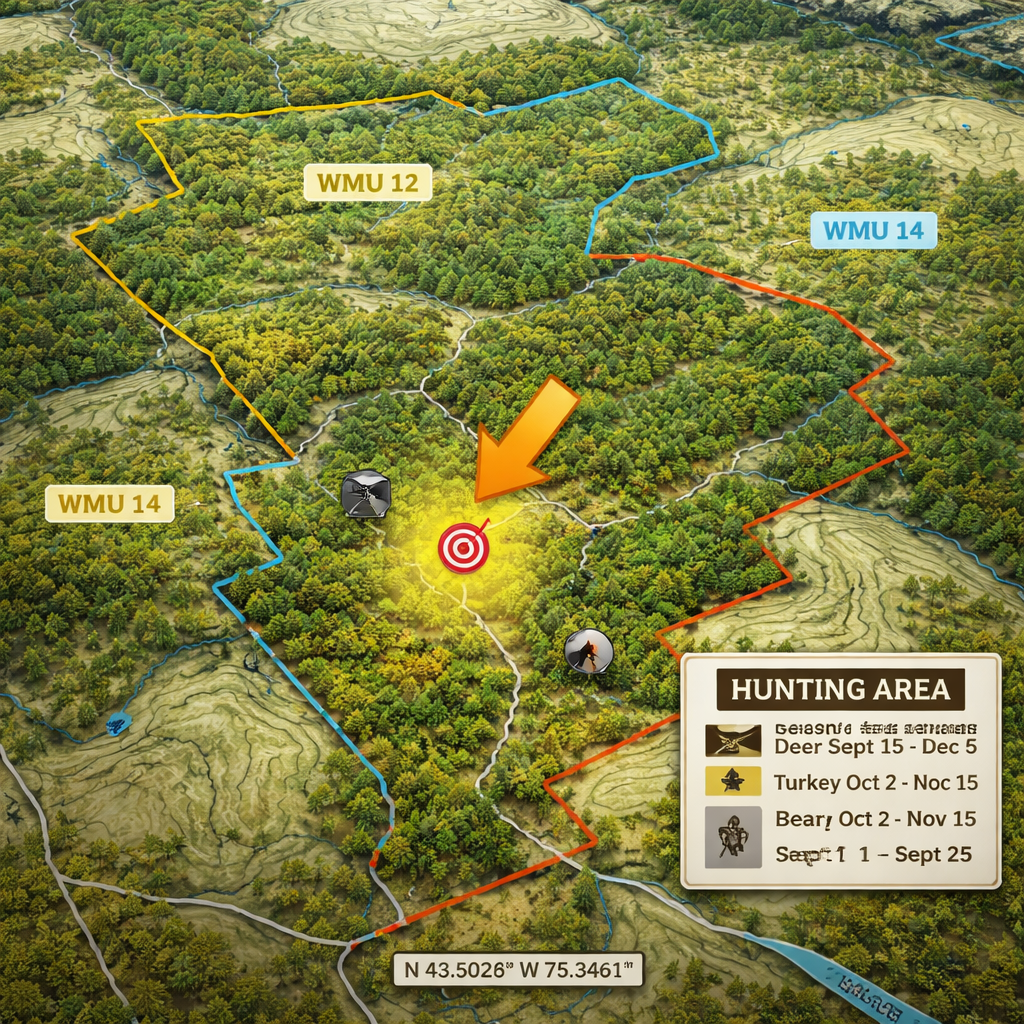
First, the map. You can pull up satellite imagery, topographic lines, and public‑land boundaries all in one view. Tap a spot and the app instantly tells you the WMU, the season dates, and any bag limits. That saves you from flipping a phone or a notebook.
Second, the calendar. HuntTrack Pro syncs with your phone’s calendar and adds hunting‑specific events. When a season opens, you get a push notification. When a tag expires, you see a reminder. You can even set custom alerts for sunrise, sunset, or legal shooting hours.
Third, the log. After each day out you can add a quick entry: species, location, weapon, and results. The app then crunches your data and shows you trends , like which spots give you the best bucks per hour.
Why it matters: Imagine you’re planning a deer hunt in WMU 12. You open HuntTrack Pro, tap the map, and see that the archery season opens on Sept 15 and ends on Oct 31. You set a reminder for the first legal day, add it to your calendar, and after each outing you log your sightings. At the end of the season you can see which days were most productive and plan better for next year.
Tips to get the most out of HuntTrack Pro:
- Download the full map for your region before you head out , offline mode works anywhere.
- Use the “quick log” button to add notes with just a few taps.
- Set custom alerts for your favorite hunting windows, not just the official season dates.
HuntTrack Pro also offers a free tier that includes basic maps and calendar sync. The paid tier adds detailed topography, historic harvest data, and the ability to share waypoints with a hunting party.
For a deeper look at how HuntTrack Pro stacks up against other tools, check out the review on NABOW Hunter’s app roundup. It walks through the UI, map accuracy, and pricing.
And if you’re hunting in Canada, you’ll appreciate the WMU integration , the same data source that powers the best Canadian hunting apps.
2. SeasonSync , Sync Your Calendar with Harvest Dates
SeasonSync focuses on the calendar side of things. While many apps give you a map, SeasonSync makes sure you never forget a date.
When you add a hunt, the app creates a calendar event that includes the exact season window for that species in that WMU. It pulls the data from official provincial sources, so you always have the latest dates.
One neat feature is the “harvest‑date sync.” After a successful hunt you log the date, and SeasonSync automatically updates your personal harvest calendar. That way you can see at a glance how many tags you’ve taken this year and plan future trips accordingly.
Here’s how to set it up in five easy steps:
- Open the app and tap “Add New Hunt.”
- Select the species and the WMU you’ll be hunting.
- Choose the season type (archery, muzzleloader, etc.).
- SeasonSync pulls the official dates and creates a calendar event.
- After each harvest, tap “Log Harvest” and the app updates the calendar.
Why you’ll love it: You never have to write down season dates on a scrap of paper again. The app also sends a push reminder the day before a season opens, so you can get to the field early.
Pro tip: Enable the “daily sunrise/sunset” overlay in the settings. The app will add those times to each hunting event, helping you stay within legal shooting hours.
SeasonSync also lets you share your calendar with a hunting buddy. That way you both see the same dates, and you can coordinate trips without endless text chains.
For a look at the user interface and a quick demo, see the video below.
SeasonSync’s free plan includes basic calendar sync and push alerts. The premium plan adds weather overlays and custom tag tracking.
3. DeerRadar , Real‑Time Population Maps (Video Demo)
DeerRadar is all about the big picture. It shows you where deer are moving, based on crowdsourced sightings and GPS collars.
The map updates every hour, so you can see hot spots and plan a drive‑by hunt that hits the most active areas. The data comes from a mix of hunter reports and wildlife agency telemetry.When you tap a hotspot, DeerRadar tells you the estimated herd size, the time of day the animals were most active, and the terrain type (open field, edge, forest).
How to use it on a hunt:
- Open the app the night before you head out.
- Check the heat map for the next morning’s activity.
- Plot a route that passes through the highest‑density zones.
- Use the “track” feature to set a waypoint at each hotspot.
- After the hunt, add your own sightings to improve the data for the next user.
DeerRadar also integrates with your phone’s GPS to give you a breadcrumb trail. That way you can backtrack safely if you get lost.
One of the strongest things about DeerRadar is the community feed. Hunters can post photos, notes, and real‑time updates. This helps you avoid areas that are already heavily pressured.
Pro tip: Turn on the “night‑mode” overlay to see where deer tend to move at dusk , those are often the best times for a successful shot.
DeerRadar’s basic version is free, but the premium tier unlocks historic trend graphs and the ability to export heat‑maps for your own analysis.
4. GamePlanner , Compare, Plan, and Track Your Hunt
GamePlanner is a comparison powerhouse. It lets you stack multiple hunts side by side, see the pros and cons of each spot, and track progress over the season.
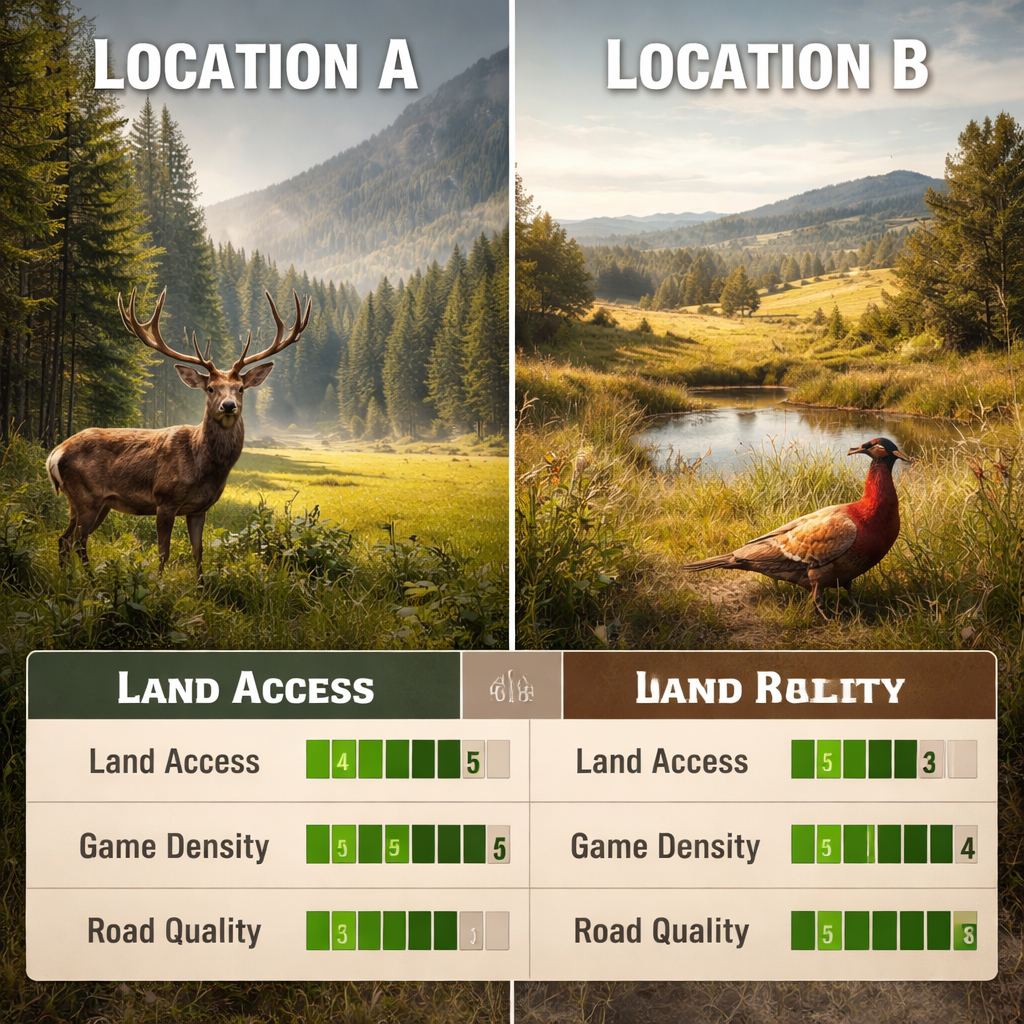
Start by adding a hunt name, the target species, and the WMU. Then you can add a list of criteria: land access, road quality, water sources, and expected game density. Each criterion gets a score out of ten, and GamePlanner tallies a total rating.
What makes it stand out is the built‑in comparison table. You can line up up to five hunts and instantly see which one has the best overall score. This is handy when you have limited budget and need to pick the most promising spot.
After the hunt, log your results: number of sightings, harvests, and any notes about terrain or weather. GamePlanner then updates the score, so you can see how reality measured up to your expectations.
Here’s a quick workflow:
- Open the app and tap “New Hunt.”
- Enter the WMU and species.
- Rate each criterion on a 1‑10 scale.
- Save the hunt. The app adds it to your comparison board.
- After the hunt, tap “Log Results” and fill in the data.
- Watch the score adjust and compare it to your other hunts.
Why it helps: You’ll stop guessing which area will give you the best buck. The data‑driven scores let you make a clear, evidence‑based decision.
Tips for power users:
- Export the comparison table as a CSV and run deeper analysis in Excel.
- Share your hunt board with a partner so you can both add notes and scores.
- Use the “offline mode” to download all map layers before you go into the backcountry.
GamePlanner also pulls in public land data from the national database, so you always see up‑to‑date access rules.
For a side‑by‑side feature comparison, see the chart from Cohunt’s hunting app comparison. It breaks down map detail, WMU integration, and offline performance for the top apps.
FAQ
What makes a hunting app good for season tracking?
A top hunting app for season tracking should give you real‑time WMU boundaries, up‑to‑date season dates, and push alerts for openings or closures. It also helps if the app works offline, lets you log harvests, and can sync with your phone’s calendar. When you have all those pieces in one place, you spend less time researching and more time in the field.
Can I use these apps across the US and Canada?
Most of the apps listed have both US and Canadian data, but the depth varies. HuntTrack Pro and GamePlanner pull official Canadian WMU layers, while some US‑focused apps may miss finer land‑type details. Check the app’s map sources before you head north, and make sure offline maps include the layers you need.
Do I need an internet connection to use these tools?
All four apps offer offline map downloads, which means you can view WMU boundaries, season dates, and your own waypoints without cell service. Just remember to download the region you’ll be hunting in before you leave home. Offline mode also saves battery life, which is a big plus on long days.
How do I keep my hunting data safe?
Most apps store your data in the cloud and sync it across devices. To protect your info, enable two‑factor authentication where available, use a strong password, and regularly back up your logs to a personal drive. If you’re worried about privacy, look for apps that let you export data as a CSV or GPX file so you can keep a local copy.
What should I look for when comparing hunting apps?
Start with map accuracy, WMU integration, and offline capability. Next, check how easy it is to log hunts and set alerts. Finally, compare price , many apps have a free tier that may be enough for casual hunters, while serious hunters often pay for premium layers and analytics.
Are there any free options that still cover the basics?
Yes. SeasonSync’s free plan gives you calendar sync and basic alerts. HuntTrack Pro also offers a free version with limited map detail. If you’re just getting started, try a free tier first, then upgrade once you see the value of deeper data and analytics.
Conclusion
Choosing the right tool can turn a confusing season into a clear plan. HuntTrack Pro gives you an all‑in‑one map, calendar, and log. SeasonSync keeps your dates locked in your phone’s calendar. DeerRadar shows you where the deer are moving in real time. GamePlanner helps you compare spots and track progress. Each one fits a different hunting style, but all share the core goal of making season tracking simple and reliable.
Take a moment to try the free versions, download offline maps, and set a test alert for the next season opening. When you see how much smoother your planning becomes, you’ll know which app earns a permanent spot on your phone.
Ready to step up your season game? Pick the app that matches your needs, set those reminders, and get out there with confidence.